Organize your code by what it does, not where it lives
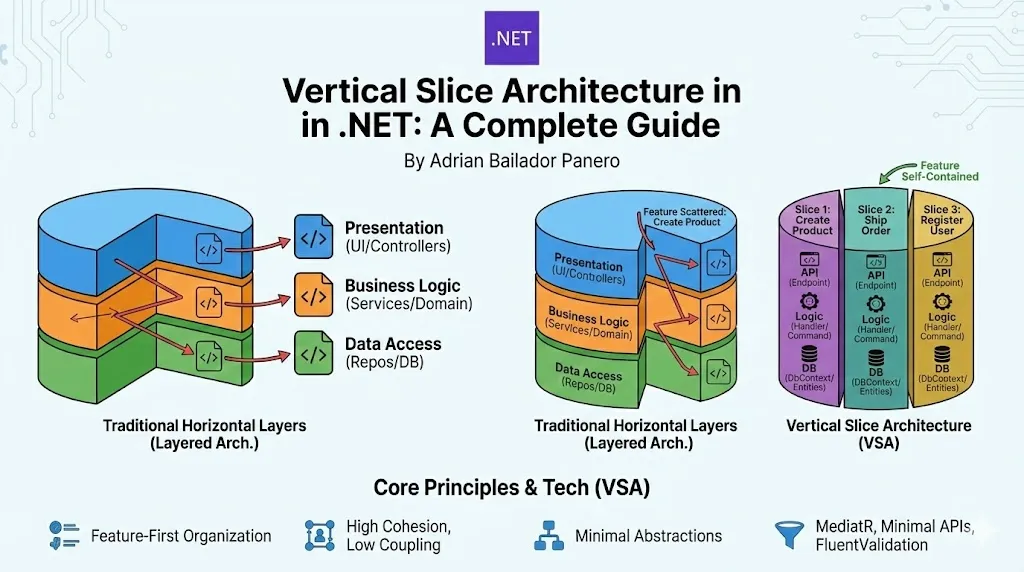
Most .NET applications are organized in horizontal layers: Presentation, Business Logic, and Data Access. But what if we organized code by business features instead?
Welcome to Vertical Slice Architecture (VSA), a pattern that’s changing how we structure modern .NET applications.
TL;DR: Vertical Slice Architecture groups all code for a feature together (API → Logic → Database). No more jumping between 5 folders to understand one thing.
🎂 What is Vertical Slice Architecture?
Vertical Slice Architecture is a code organization pattern that groups all code for a single feature or use case together, from the user interface down to the database.
The Core Concept
Think of your application as a cake. Traditional architectures cut the cake horizontally into layers:
- Top layer: Presentation (Controllers, Views)
- Middle layer: Business Logic (Services, Commands)
- Bottom layer: Data Access (Repositories, DbContext)
Vertical Slice Architecture cuts the cake vertically. Each slice contains everything needed for one specific feature:
- Slice 1: “Create Product” → Complete from API to Database
- Slice 2: “Ship Order” → Complete from API to Database
- Slice 3: “Register User” → Complete from API to Database
Why “Vertical”?
A vertical slice cuts through all layers for a single feature. When you need to add a field to “Create Product”, you only touch files in Features/Products/Create/. No jumping between Controllers → Services → Repositories.
📁 Project Structure
MyApp/
├── Features/
│   ├── Products/
│   │   ├── Create/
│   │   │   ├── CreateProduct.cs
│   │   │   └── CreateProductEndpoint.cs
│   │   ├── Update/
│   │   ├── Delete/
│   │   └── GetById/
│   ├── Orders/
│   │   ├── Create/
│   │   ├── Ship/
│   │   └── Cancel/
│   └── Customers/
├── Common/              # Only truly shared infrastructure
│   ├── Behaviors/       # MediatR pipeline behaviors
│   └── Results/
├── Data/
│   ├── AppDbContext.cs
│   └── Entities/
└── Program.cs
Everything for “Create Product” lives in one place: Features/Products/Create/.
⚖️ Core Principles
1. Feature-First Organization
Code is organized by what it does (business capability), not by what it is (technical role).
| Traditional (Layered) | Vertical Slice |
|---|---|
Controllers/ProductsController.cs | Features/Products/Create/CreateProduct.cs |
Services/ProductService.cs | Features/Products/Create/CreateProductEndpoint.cs |
Repositories/ProductRepository.cs | (Logic & Data access are inside the slice) |
To understand “Create Product”, you read one folder instead of three files in three different folders.
2. High Cohesion, Low Coupling
- High Cohesion: Related code stays together. Command, validation, and logic are all in one file or folder. You see the complete picture immediately.
- Low Coupling: Features don’t depend on each other. Deleting “Create Product” won’t break “Ship Order”. Each feature can evolve independently.
3. Minimal Abstractions
Create abstractions only when you have actual shared behavior. In VSA, we often use the DbContext directly in the handler.
Don’t do this:
// Abstraction for a single implementation
public interface IProductRepository
{
    Task<Product> GetByIdAsync(int id);
}

public class ProductRepository : IProductRepository
{
    // Only implementation, will never be swapped
}
Do this:
// Direct database access in the handler
public class Handler : IRequestHandler<Query, Result<ProductDto>>
{
    private readonly AppDbContext _db;

    public async Task<Result<ProductDto>> Handle(Query request, CancellationToken ct)
    {
        var product = await _db.Products
            .Where(p => p.Id == request.Id)
            .Select(p => new ProductDto { Id = p.Id, Name = p.Name })
            .FirstOrDefaultAsync(ct);

        return product != null
            ? Result<ProductDto>.Success(product)
            : Result<ProductDto>.Failure("Product not found");
    }
}
If you aren’t swapping your DB for a text file tomorrow, you probably don’t need a Repository Layer.
4. Duplication Over Wrong Abstraction
It’s okay to duplicate a DTO or a small piece of logic between slices if it keeps them independent.
// Products/Create
var product = new Product {
    CreatedAt = DateTime.UtcNow,
    CreatedBy = _currentUser.Id
};

// Orders/Create - Same code, that's OK!
var order = new Order {
    CreatedAt = DateTime.UtcNow,
    CreatedBy = _currentUser.Id
};
The Rule of Three: Extract common code only when you use it in 3+ features, not before.
Why? Because those two features might diverge in the future. Premature abstraction creates coupling.
🛠️ Complete Implementation: “Create Product”
Let’s build a feature from scratch using MediatR and Minimal APIs.
Step 1: The Command and Handler
// Features/Products/Create/CreateProduct.cs

namespace MyApp.Features.Products.Create;

public static class CreateProduct
{
    // The request
    public record Command(
        string Name,
        decimal Price,
        int CategoryId
    ) : IRequest<Result<int>>;

    // Validation rules
    public class Validator : AbstractValidator<Command>
    {
        public Validator()
        {
            RuleFor(x => x.Name).NotEmpty().MaximumLength(100);
            RuleFor(x => x.Price).GreaterThan(0).LessThan(1000000);
            RuleFor(x => x.CategoryId).GreaterThan(0);
        }
    }

    // Business logic
    public class Handler : IRequestHandler<Command, Result<int>>
    {
        private readonly AppDbContext _db;
        private readonly ILogger<Handler> _logger;

        public Handler(AppDbContext db, ILogger<Handler> logger)
        {
            _db = db;
            _logger = logger;
        }

        public async Task<Result<int>> Handle(Command request, CancellationToken ct)
        {
            // Business rule: Category must exist
            var categoryExists = await _db.Categories
                .AnyAsync(c => c.Id == request.CategoryId, ct);

            if (!categoryExists)
                return Result<int>.Failure("Category not found");

            // Create product
            var product = new Product {
                Name = request.Name,
                Price = request.Price,
                CategoryId = request.CategoryId,
                CreatedAt = DateTime.UtcNow
            };

            _db.Products.Add(product);
            await _db.SaveChangesAsync(ct);

            _logger.LogInformation(
                "Created product {ProductId}: {ProductName}",
                product.Id, product.Name);

            return Result<int>.Success(product.Id);
        }
    }
}
Everything in one file: Request, validation, and business logic. You can understand the entire feature without opening multiple files.
Step 2: The Endpoint
// Features/Products/Create/CreateProductEndpoint.cs

public class CreateProductEndpoint : ICarterModule
{
    public void AddRoutes(IEndpointRouteBuilder app)
    {
        app.MapPost("/api/products", async (
            CreateProduct.Command request,
            IMediator mediator,
            CancellationToken ct) =>
        {
            var result = await mediator.Send(request, ct);

            return result.IsSuccess
                ? Results.Created($"/api/products/{result.Value}", new { id = result.Value })
                : Results.BadRequest(new { error = result.Error });
        })
        .WithName("CreateProduct")
        .WithTags("Products");
    }
}
That’s it! A complete feature in 2 files.
Step 3: Supporting Types
// Common/Results/Result.cs

public class Result<T>
{
    public bool IsSuccess { get; }
    public T Value { get; }
    public string Error { get; }

    private Result(bool isSuccess, T value, string error)
    {
        IsSuccess = isSuccess;
        Value = value;
        Error = error;
    }

    public static Result<T> Success(T value) => new(true, value, string.Empty);
    public static Result<T> Failure(string error) => new(false, default!, error);
}
🌊 How a Request Flows
Let’s trace a request through the system:
User Request: POST /api/products
{
  "name": "Laptop",
  "price": 1299.99,
  "categoryId": 5
}
Flow:
-
Endpoint receives request → Deserializes into
CreateProduct.Command -
MediatR pipeline begins →
mediator.Send(request) -
Validation runs automatically →
ValidationBehaviorintercepts and runsCreateProduct.Validator- If validation fails → Returns
400 Bad Request - If validation passes → Continues to handler
- If validation fails → Returns
-
Logging (automatic) →
LoggingBehaviorlogs the request -
Handler executes → Business rules, database operations
-
Response returned →
Result<int>converted to HTTP response- Success →
201 Created - Failure →
400 Bad Request
- Success →
Key insight: Validation and logging happen automatically via MediatR pipeline behaviors. You don’t write that code in every handler.
🔄 Cross-Cutting Concerns with MediatR Behaviors
Common functionality is handled by pipeline behaviors, not inheritance or base classes.
Validation Behavior
// Common/Behaviors/ValidationBehavior.cs

public class ValidationBehavior<TRequest, TResponse> : IPipelineBehavior<TRequest, TResponse>
    where TRequest : IRequest<TResponse>
{
    private readonly IEnumerable<IValidator<TRequest>> _validators;

    public async Task<TResponse> Handle(
        TRequest request,
        RequestHandlerDelegate<TResponse> next,
        CancellationToken ct)
    {
        if (!_validators.Any())
            return await next();

        var context = new ValidationContext<TRequest>(request);
        var failures = _validators
            .Select(v => v.Validate(context))
            .SelectMany(result => result.Errors)
            .Where(f => f != null)
            .ToList();

        if (failures.Any())
            throw new ValidationException(failures);

        return await next();
    }
}
Logging Behavior
// Common/Behaviors/LoggingBehavior.cs

public class LoggingBehavior<TRequest, TResponse> : IPipelineBehavior<TRequest, TResponse>
    where TRequest : IRequest<TResponse>
{
    private readonly ILogger<LoggingBehavior<TRequest, TResponse>> _logger;

    public async Task<TResponse> Handle(
        TRequest request,
        RequestHandlerDelegate<TResponse> next,
        CancellationToken ct)
    {
        _logger.LogInformation("Handling {RequestName}", typeof(TRequest).Name);
        var response = await next();
        _logger.LogInformation("Handled {RequestName}", typeof(TRequest).Name);
        return response;
    }
}
Register Behaviors in Program.cs
builder.Services.AddMediatR(cfg =>
{
    cfg.RegisterServicesFromAssembly(typeof(Program).Assembly);
    cfg.AddBehavior(typeof(IPipelineBehavior<,>), typeof(LoggingBehavior<,>));
    cfg.AddBehavior(typeof(IPipelineBehavior<,>), typeof(ValidationBehavior<,>));
});
Every feature automatically gets validation and logging without touching each handler.
🧪 Testing Strategy
In VSA, we prioritize Integration Tests. Since the slice is self-contained, testing the API endpoint with a real (or in-memory) database gives you the highest confidence with the least effort.
public class CreateProductTests : IClassFixture<WebApplicationFactory<Program>>
{
    private readonly HttpClient _client;

    public CreateProductTests(WebApplicationFactory<Program> factory)
    {
        _client = factory.CreateClient();
    }

    [Fact]
    public async Task CreateProduct_WithValidData_ReturnsCreated()
    {
        // Arrange
        var command = new {
            name = "Laptop",
            price = 999,
            categoryId = 1
        };

        // Act
        var response = await _client.PostAsJsonAsync("/api/products", command);

        // Assert
        response.StatusCode.Should().Be(HttpStatusCode.Created);
        var productId = await response.Content.ReadFromJsonAsync<int>();
        productId.Should().BeGreaterThan(0);
    }

    [Fact]
    public async Task CreateProduct_WithInvalidPrice_ReturnsBadRequest()
    {
        // Arrange
        var command = new {
            name = "Laptop",
            price = -10,  // Invalid
            categoryId = 1
        };

        // Act
        var response = await _client.PostAsJsonAsync("/api/products", command);

        // Assert
        response.StatusCode.Should().Be(HttpStatusCode.BadRequest);
    }
}
Why integration tests?
- Tests the entire slice end-to-end
- Validates that all pieces work together
- Catches integration issues early
- Closer to how users actually use the system
🔧 Essential Setup
Required NuGet Packages
# MediatR for request/response pattern
dotnet add package MediatR

# FluentValidation for validation
dotnet add package FluentValidation
dotnet add package FluentValidation.DependencyInjectionExtensions

# Carter for minimal API organization (optional)
dotnet add package Carter

# Entity Framework Core
dotnet add package Microsoft.EntityFrameworkCore
dotnet add package Microsoft.EntityFrameworkCore.SqlServer
Program.cs Configuration
var builder = WebApplication.CreateBuilder(args);

// Database
builder.Services.AddDbContext<AppDbContext>(options =>
    options.UseSqlServer(builder.Configuration.GetConnectionString("DefaultConnection")));

// MediatR with behaviors
builder.Services.AddMediatR(cfg =>
{
    cfg.RegisterServicesFromAssembly(typeof(Program).Assembly);
    cfg.AddBehavior(typeof(IPipelineBehavior<,>), typeof(LoggingBehavior<,>));
    cfg.AddBehavior(typeof(IPipelineBehavior<,>), typeof(ValidationBehavior<,>));
});

// FluentValidation
builder.Services.AddValidatorsFromAssemblyContaining<Program>();

// Carter (if using)
builder.Services.AddCarter();

var app = builder.Build();

app.UseHttpsRedirection();
app.MapCarter();  // Maps all endpoints

app.Run();
📚 Common Patterns
Pattern 1: Query Features (Read-Only)
// Features/Products/GetById/GetProduct.cs

public static class GetProduct
{
    public record Query(int Id) : IRequest<Result<ProductDto>>;

    public record ProductDto(int Id, string Name, decimal Price, string CategoryName);

    public class Handler : IRequestHandler<Query, Result<ProductDto>>
    {
        private readonly AppDbContext _db;

        public async Task<Result<ProductDto>> Handle(Query request, CancellationToken ct)
        {
            var product = await _db.Products
                .Where(p => p.Id == request.Id)
                .Select(p => new ProductDto(
                    p.Id,
                    p.Name,
                    p.Price,
                    p.Category.Name
                ))
                .FirstOrDefaultAsync(ct);

            return product != null
                ? Result<ProductDto>.Success(product)
                : Result<ProductDto>.Failure("Product not found");
        }
    }
}
Key points:
- Use
Selectto project only needed data - Return DTOs, not entities
- One query, optimized for this specific use case
Pattern 2: List/Search Features
// Features/Products/List/ListProducts.cs

public static class ListProducts
{
    public record Query(
        int Page = 1,
        int PageSize = 20,
        string? SearchTerm = null,
        int? CategoryId = null
    ) : IRequest<Result<PagedResult<ProductDto>>>;

    public record ProductDto(int Id, string Name, decimal Price);

    public record PagedResult<T>(List<T> Items, int TotalCount, int Page, int PageSize);

    public class Handler : IRequestHandler<Query, Result<PagedResult<ProductDto>>>
    {
        private readonly AppDbContext _db;

        public async Task<Result<PagedResult<ProductDto>>> Handle(
            Query request,
            CancellationToken ct)
        {
            var query = _db.Products.AsQueryable();

            // Apply filters
            if (!string.IsNullOrWhiteSpace(request.SearchTerm))
                query = query.Where(p => p.Name.Contains(request.SearchTerm));

            if (request.CategoryId.HasValue)
                query = query.Where(p => p.CategoryId == request.CategoryId.Value);

            // Get total count
            var totalCount = await query.CountAsync(ct);

            // Pagination
            var items = await query
                .Skip((request.Page - 1) * request.PageSize)
                .Take(request.PageSize)
                .Select(p => new ProductDto(p.Id, p.Name, p.Price))
                .ToListAsync(ct);

            return Result<PagedResult<ProductDto>>.Success(
                new PagedResult<ProductDto>(items, totalCount, request.Page, request.PageSize));
        }
    }
}
Pattern 3: Features with Domain Events
// Features/Orders/Create/CreateOrder.cs

public static class CreateOrder
{
    public record Command(int CustomerId, List<OrderItemDto> Items) : IRequest<Result<int>>;

    public class Handler : IRequestHandler<Command, Result<int>>
    {
        private readonly AppDbContext _db;
        private readonly IMediator _mediator;

        public async Task<Result<int>> Handle(Command request, CancellationToken ct)
        {
            var order = new Order
            {
                CustomerId = request.CustomerId,
                Status = OrderStatus.Pending,
                CreatedAt = DateTime.UtcNow
            };

            _db.Orders.Add(order);
            await _db.SaveChangesAsync(ct);

            // Publish event - other features can react
            await _mediator.Publish(new OrderCreated(order.Id, request.Items), ct);

            return Result<int>.Success(order.Id);
        }
    }
}

// Features/Inventory/ReserveStock/OrderCreatedHandler.cs

public class OrderCreatedHandler : INotificationHandler<OrderCreated>
{
    private readonly AppDbContext _db;

    public async Task Handle(OrderCreated notification, CancellationToken ct)
    {
        // Update inventory in its own feature
        foreach (var item in notification.Items)
        {
            var product = await _db.Products.FindAsync(item.ProductId, ct);
            if (product != null)
                product.ReservedStock += item.Quantity;
        }

        await _db.SaveChangesAsync(ct);
    }
}
Key insight: Features stay decoupled but can react to each other’s events through MediatR notifications.
🚀 Can I Use This in an Existing App?
Yes! VSA’s superpower is that you can start TODAY without rewriting anything.
Incremental Adoption Strategy
Phase 1: Coexistence (Month 1-2)
Keep your layered code. Build new features as slices. They can coexist:
MyApp/
├── Controllers/          # Old layered code - still works
│   ├── ProductsController.cs
│   └── OrdersController.cs
├── Services/             # Old layered code - still works
│   ├── ProductService.cs
│   └── OrderService.cs
├── Repositories/         # Old layered code - still works
│   └── ProductRepository.cs
├── Features/             # New slices - start here!
│   ├── Shipping/
│   │   ├── CalculateRate/
│   │   └── TrackPackage/
│   └── Notifications/
│       └── SendEmail/
Benefits:
✅ Zero risk to existing functionality
✅ Team learns VSA gradually
✅ New features ship faster
✅ Easy to rollback if needed
Phase 2: Strategic Migration (Month 3-6)
Migrate one feature at a time. Start with simple CRUD:
// Step 1: Pick a simple feature
// Good candidates:
// - Recently added features (less legacy baggage)
// - Features that change frequently
// - Simple CRUD with few dependencies

// Step 2: Create slice
Features/Products/Archive/ArchiveProduct.cs

// Step 3: Test thoroughly

// Step 4: Delete old code ONLY after new code is in production
Phase 3: Live with Both (Ongoing)
After 6 months:
- 70-80% slice-based
- 20-30% still layered
- That’s perfectly fine!
Don’t force migration if the old code works. Focus on new development in slices.
Real Timeline Example:
Month 1:  Build 3 new features as slices
Month 2:  Migrate 5 simple CRUD operations
Month 3:  Migrate 3 medium features
Month 4:  Build all new features as slices
Month 5:  Migrate 2 complex features
Month 6:  Stop migrating, focus on new development
Result:   ~75% slice-based, team velocity up 40%
When to Stop Migrating:
- Feature is complex and working fine
- Migration cost > benefit
- Feature rarely changes
- Team isn’t comfortable yet
⚠️ Common Pitfalls (And How to Avoid Them)
Even with its simplicity, it’s easy to lose the “Vertical” spirit. Here are the most common mistakes:
1. The “Shared” Folder Trap
The #1 question when starting with VSA: “Where do I put code that’s used by multiple features? Won’t I end up with a huge Shared folder?”
The Problem:
You see two features that both send emails and immediately create:
Common/
├── Services/
│   └── EmailService.cs
├── DTOs/
│   ├── ProductDto.cs         # Feature-specific!
│   └── OrderDto.cs           # Feature-specific!
├── Validators/
│   └── CreateOrderValidator.cs  # Feature-specific!
└── Helpers/
    └── (Everything else)
Before you know it, Common is a dumping ground and features are tightly coupled.
The Solution: A Simple Rule
Share infrastructure, duplicate business logic.
✅ OK to share:
Common/
├── Behaviors/              # MediatR pipeline (logging, validation)
├── Results/               # Generic Result<T> type
├── Interfaces/
│   ├── IEmailSender.cs    # External services
│   └── IFileStorage.cs
└── Extensions/
    └── ValidationExtensions.cs  # Simple reusable rules
Why: These are cross-cutting concerns that apply to ALL features uniformly.
❌ Don’t share:
- DTOs between features (each feature has its own)
- Business logic between features (duplicate instead)
- Feature-specific validators
- “Helpers” or “Utilities” folders
The Key Insight:
Just because features share the same database entity doesn’t mean they share DTOs:
// Data/Entities/Product.cs - Shared database entity
public class Product
{
    public int Id { get; set; }
    public string Name { get; set; }
    public decimal Price { get; set; }
}

// Features/Products/Create/CreateProduct.cs
public record Command(string Name, decimal Price); // Only what Create needs

// Features/Products/List/ListProducts.cs
public record ProductDto(int Id, string Name, decimal Price); // Different!

// Features/Products/GetDetails/GetProductDetails.cs
public record DetailedProductDto(
    int Id,
    string Name,
    decimal Price,
    string Description,
    List<ReviewDto> Reviews
); // Completely different!
The Health Check:
Your Common folder is healthy if:
✅ < 10 files total
✅ No business logic
✅ No feature-specific code
✅ Could be published as a NuGet package
Your Common folder has problems if:
❌ > 20 files
❌ Has “Helpers” folder
❌ Has DTOs
❌ Features depend on it heavily
When in Doubt:
Ask: “Is this infrastructure or business logic?”
- Infrastructure → Common (maybe)
- Business logic → Feature (definitely)
Remember: Three files in Common is better than thirty.
2. Logic Leaking into Endpoints
The Error: Putting if/else business rules inside the Minimal API or Controller.
// ❌ DON'T DO THIS
app.MapPost("/api/products", async (CreateProductRequest request, AppDbContext db) =>
{
    // Business logic in endpoint!
    if (string.IsNullOrEmpty(request.Name))
        return Results.BadRequest("Name is required");

    if (request.Price <= 0)
        return Results.BadRequest("Price must be positive");

    var product = new Product { ... };
    db.Products.Add(product);
    await db.SaveChangesAsync();

    return Results.Created(...);
});
The Solution: The endpoint should be a thin wrapper. Its only job is to receive the request and call mediator.Send().
// ✅ DO THIS
app.MapPost("/api/products", async (CreateProduct.Command request, IMediator mediator) =>
{
    var result = await mediator.Send(request);
    return result.IsSuccess ? Results.Created(...) : Results.BadRequest(result.Error);
});
All business logic and validation stays in the handler and validator.
3. Creating “God” Slices
The Error: Creating a single slice called ProductManagement that handles Create, Update, Delete, List, Search, Export, Import.
Features/
└── Products/
    └── ProductManagement/     # ❌ God slice
        └── ProductManager.cs   # 2000 lines of code
The Solution: Split them! Each use case is its own slice.
Features/
└── Products/
    ├── Create/               # ✅ One responsibility
    ├── Update/               # ✅ One responsibility
    ├── Delete/               # ✅ One responsibility
    ├── List/                 # ✅ One responsibility
    └── Search/               # ✅ One responsibility
Why: Keeping them separate makes code easier to:
- Find (knows exactly where “Create Product” lives)
- Test (smaller, focused tests)
- Modify (changes don’t affect other operations)
- Delete (remove entire folder if feature is deprecated)
4. Premature Extraction to Common
The Error: Seeing similar code twice and immediately extracting to Common.
// Two features have similar validation
// Features/Products/Create - validates price
// Features/Orders/Create - validates total

// DON'T immediately create:
// Common/Validators/MoneyValidator.cs
The Solution: Wait for the third usage (Rule of Three). The code might diverge:
- Products might need different price rules per category
- Orders might need different rules for wholesale vs retail
Copy-paste twice. Extract on the third usage.
✅ When to Use Vertical Slice Architecture
Perfect for:
✅ CRUD-heavy applications - E-commerce, CMS, dashboards
✅ Microservices - Each service naturally organized by features
✅ APIs with many endpoints - Easy to find and modify specific operations
✅ Teams that value velocity - Less ceremony = faster development
✅ Evolutionary systems - When you don’t know how the system will grow
Consider alternatives when:
❌ Complex shared domain logic - Heavy domain modeling with aggregates
❌ Need to swap infrastructure frequently - Multiple database providers
❌ Building frameworks or libraries - Reusability > feature velocity
🎯 Key Takeaways
-
Organize by feature, not by layer - Everything for “Create Product” in one place
-
High cohesion, low coupling - Features are self-contained and independent
-
Minimal abstractions - Only create them when you have actual shared behavior
-
Incremental adoption - Start today with new features, migrate gradually
-
Share infrastructure, duplicate business logic - Keep the Common folder small
-
MediatR behaviors handle cross-cutting concerns - Validation and logging are automatic
-
Integration tests give highest confidence - Test complete slices end-to-end
💬 What’s Next?
Now that you understand Vertical Slice Architecture, here are some questions you might have:
“How do I handle Domain Events to communicate between slices without coupling them?”
Domain events with MediatR notifications let features react to each other while staying independent. A OrderCreated event can trigger inventory updates, email notifications, and analytics tracking - all in separate handlers.
“What about complex business rules shared across features?”
If you truly have shared domain logic (not just similar code), you can create a small Domain layer with that core logic. Features call into it, but remain independent slices.
“Can I mix this with DDD?”
Absolutely! Use Vertical Slices for most features, and a Domain layer for your core business aggregates. They complement each other well.