
My API crashed in production. 500,000 database records, a List
I spent two hours staring at the logs before I understood what happened. The fix took ten minutes. This is what I learned — and how it will save you the same headache.
The Problem We’re Solving
I know, I know. You’ve written this a hundred times:
// ❌ The problem: 1 million records in memory
public async Task<List<LogEntry>> GetAllLogsAsync()
{
    return await _context.LogEntries.ToListAsync(); // Boom! Memory explosion
}
For a handful of records? Fine. But the day your dataset grows beyond what fits in RAM, that innocent ToListAsync() becomes a ticking bomb.
What Is IAsyncEnumerable?
Introduced in C# 8.0 (.NET Core 3.0), IAsyncEnumerable<T> lets you stream data asynchronously — processing items one by one as they arrive, without ever holding the full collection in memory. Think of it like reading a book page by page instead of photocopying the entire thing before you start.
// ✅ The solution: stream as data arrives
public IAsyncEnumerable<LogEntry> StreamLogsAsync()
{
    return _context.LogEntries.AsAsyncEnumerable(); // Memory-efficient
}
Production-Grade Patterns
These are the four patterns I reach for most often. Not theory — things I’ve actually shipped.
Pattern 1: Entity Framework Core Streaming
This is where most people start, and for good reason. If you have EF Core and a table that grows over time, you need this pattern sooner or later.
public class LogRepository
{
    private readonly AppDbContext _context;

    public LogRepository(AppDbContext context)
    {
        _context = context;
    }

    /// <summary>
    /// Streams logs matching criteria without loading all into memory.
    /// WARNING: Do NOT use with OrderBy/Limit without careful consideration.
    /// </summary>
    public async IAsyncEnumerable<LogEntry> StreamLogsAsync(
        DateTime from,
        DateTime to,
        [EnumeratorCancellation] CancellationToken ct = default)
    {
        await foreach (var log in _context.LogEntries
            .Where(l => l.Timestamp >= from && l.Timestamp <= to)
            .AsAsyncEnumerable()
            .WithCancellation(ct))
        {
            yield return log;
        }
    }

    /// <summary>
    /// Chunks large exports to prevent connection timeouts.
    /// </summary>
    public async IAsyncEnumerable<IReadOnlyList<LogEntry>> StreamBatchedLogsAsync(
        int batchSize = 1000,
        [EnumeratorCancellation] CancellationToken ct = default)
    {
        var query = _context.LogEntries
            .OrderBy(l => l.Id)
            .AsAsyncEnumerable();

        var batch = new List<LogEntry>(batchSize);

        await foreach (var log in query.WithCancellation(ct))
        {
            batch.Add(log);

            if (batch.Count >= batchSize)
            {
                yield return batch.ToList();
                batch.Clear();
            }
        }

        // Don't forget the partial batch
        if (batch.Count > 0)
        {
            yield return batch;
        }
    }
}
Pattern 2: HttpClient Streaming with JSON
Third-party APIs that return thousands of records in a single response are surprisingly common. Without streaming, you buffer the entire response before deserializing a single object. HttpCompletionOption.ResponseHeadersRead is the line that changes everything here — don’t forget it.
public class StreamingApiClient
{
    private readonly HttpClient _httpClient;
    private readonly JsonSerializerOptions _jsonOptions;

    public StreamingApiClient(HttpClient httpClient)
    {
        _httpClient = httpClient;
        _jsonOptions = new JsonSerializerOptions
        {
            PropertyNameCaseInsensitive = true,
            DefaultBufferSize = 4096 // Tune for your payload size
        };
    }

    /// <summary>
    /// Streams items from an NDJSON endpoint.
    /// Each line is a separate JSON object.
    /// </summary>
    public async IAsyncEnumerable<T> StreamFromNdJsonAsync<T>(
        string url,
        [EnumeratorCancellation] CancellationToken ct = default)
    {
        using var response = await _httpClient.GetAsync(
            url,
            HttpCompletionOption.ResponseHeadersRead, // Critical: stream, don't buffer
            ct);

        response.EnsureSuccessStatusCode();

        await using var stream = await response.Content.ReadAsStreamAsync(ct);
        using var reader = new StreamReader(stream, Encoding.UTF8);

        string? line;
        while ((line = await reader.ReadLineAsync(ct)) != null)
        {
            if (string.IsNullOrWhiteSpace(line))
                continue;

            // Deserialize each line independently
            var item = JsonSerializer.Deserialize<T>(line, _jsonOptions);

            if (item != null)
                yield return item;
        }
    }

    /// <summary>
    /// Streams using System.Text.Json's built-in async deserialization.
    /// Requires JSON array format: [{}, {}, {}]
    /// </summary>
    public async IAsyncEnumerable<T> StreamJsonArrayAsync<T>(
        string url,
        [EnumeratorCancellation] CancellationToken ct = default)
    {
        using var response = await _httpClient.GetAsync(
            url,
            HttpCompletionOption.ResponseHeadersRead,
            ct);

        response.EnsureSuccessStatusCode();

        await using var stream = await response.Content.ReadAsStreamAsync(ct);

        await foreach (var item in JsonSerializer.DeserializeAsyncEnumerable<T>(
            stream,
            _jsonOptions,
            ct))
        {
            if (item != null)
                yield return item;
        }
    }
}
Pattern 3: File Processing Pipeline
CSV imports, log analysis, data migrations — anything that reads a file line by line and does something with each row. The key insight here is that you can chain multiple IAsyncEnumerable<T> methods into a pipeline where memory stays flat regardless of file size.
public class LogFileProcessor
{
    /// <summary>
    /// Reads, transforms, and writes logs in a streaming pipeline.
    /// Memory usage stays constant regardless of file size.
    /// </summary>
    public async IAsyncEnumerable<ProcessedLog> ProcessLogFileAsync(
        string filePath,
        [EnumeratorCancellation] CancellationToken ct = default)
    {
        await foreach (var rawLog in ReadLinesAsync(filePath, ct))
        {
            // Transform on the fly - no memory buildup
            if (TryParseLog(rawLog, out var parsed))
            {
                var enriched = await EnrichLogAsync(parsed, ct);
                yield return enriched;
            }
        }
    }

    private static async IAsyncEnumerable<string> ReadLinesAsync(
        string path,
        [EnumeratorCancellation] CancellationToken ct = default)
    {
        using var reader = new StreamReader(path, Encoding.UTF8);

        string? line;
        while ((line = await reader.ReadLineAsync(ct)) != null)
        {
            yield return line;
        }
    }

    private static bool TryParseLog(string raw, out ParsedLog parsed)
    {
        // Your parsing logic here
        parsed = default!;
        return true;
    }

    private static async Task<ProcessedLog> EnrichLogAsync(
        ParsedLog log,
        CancellationToken ct)
    {
        // Async enrichment (e.g., lookup user info)
        await Task.Delay(1, ct); // Simulate async work
        return new ProcessedLog(log);
    }
}

public record ParsedLog(string Timestamp, string Level, string Message);
public record ProcessedLog(ParsedLog Original);
Pattern 4: Controller Action with Streaming Response
ASP.NET Core handles IAsyncEnumerable<T> return types natively — it serializes as NDJSON and starts sending data to the client immediately. The client doesn’t wait for the full dataset; it starts receiving records as soon as the first one is ready.
[ApiController]
[Route("api/[controller]")]
public class ReportsController : ControllerBase
{
    private readonly IReportService _reportService;

    public ReportsController(IReportService reportService)
    {
        _reportService = reportService;
    }

    /// <summary>
    /// Streams CSV data directly to the client.
    /// Client starts receiving data immediately, no server buffering.
    /// </summary>
    [HttpGet("export")]
    public IAsyncEnumerable<ReportRow> ExportData(
        [FromQuery] DateTime from,
        [FromQuery] DateTime to,
        CancellationToken ct)
    {
        // ASP.NET Core automatically serializes IAsyncEnumerable as NDJSON
        // or use custom formatting for CSV
        return _reportService.StreamReportAsync(from, to, ct);
    }

    /// <summary>
    /// Custom streaming for Server-Sent Events (SSE).
    /// </summary>
    [HttpGet("live-events")]
    public async IAsyncEnumerable<ServerSentEvent> GetLiveEvents(
        [EnumeratorCancellation] CancellationToken ct)
    {
        await foreach (var evt in _reportService.SubscribeToEventsAsync(ct))
        {
            yield return new ServerSentEvent
            {
                Id = evt.Id,
                Event = evt.Type,
                Data = JsonSerializer.Serialize(evt.Payload)
            };
        }
    }
}

public record ReportRow(string Id, string Name, decimal Value);
public record ServerSentEvent(string Id, string Event, string Data);
Before vs After: Performance Comparison
Let’s make it concrete. Same data, same operation, two approaches.
The Old Way: List (Before)
public async Task<List<LargeRecord>> ProcessAllRecordsAsync()
{
    // Memory: O(n) - grows with dataset size
    // Time to first result: O(n) - wait for all
    var allRecords = await _repository.GetAllAsync();

    var processed = new List<LargeRecord>();
    foreach (var record in allRecords)
    {
        processed.Add(await ProcessAsync(record));
    }

    return processed;
}

// Usage - memory spikes here
var results = await ProcessAllRecordsAsync();
foreach (var item in results)
{
    await WriteToDiskAsync(item);
}
1M records at 100KB each — what actually happens:
- Peak Memory: ~95 GB (yes, gigabytes)
- Time to first output: 45 seconds of waiting
- Result: OutOfMemoryException — your server gives up before you do
The New Way: IAsyncEnumerable (After)
public async IAsyncEnumerable<LargeRecord> ProcessAllRecordsAsync(
    [EnumeratorCancellation] CancellationToken ct = default)
{
    // Memory: O(1) - constant regardless of dataset size
    // Time to first result: O(1) - immediate streaming
    await foreach (var record in _repository.StreamAllAsync(ct))
    {
        yield return await ProcessAsync(record);
    }
}

// Usage - constant memory footprint
await foreach (var item in ProcessAllRecordsAsync().WithCancellation(ct))
{
    await WriteToDiskAsync(item);
}
Same 1M records — completely different story:
- Peak Memory: ~150 MB (constant, regardless of dataset size)
- Time to first output: 50ms — the client starts receiving data almost instantly
- Result: Smooth streaming, server stays healthy
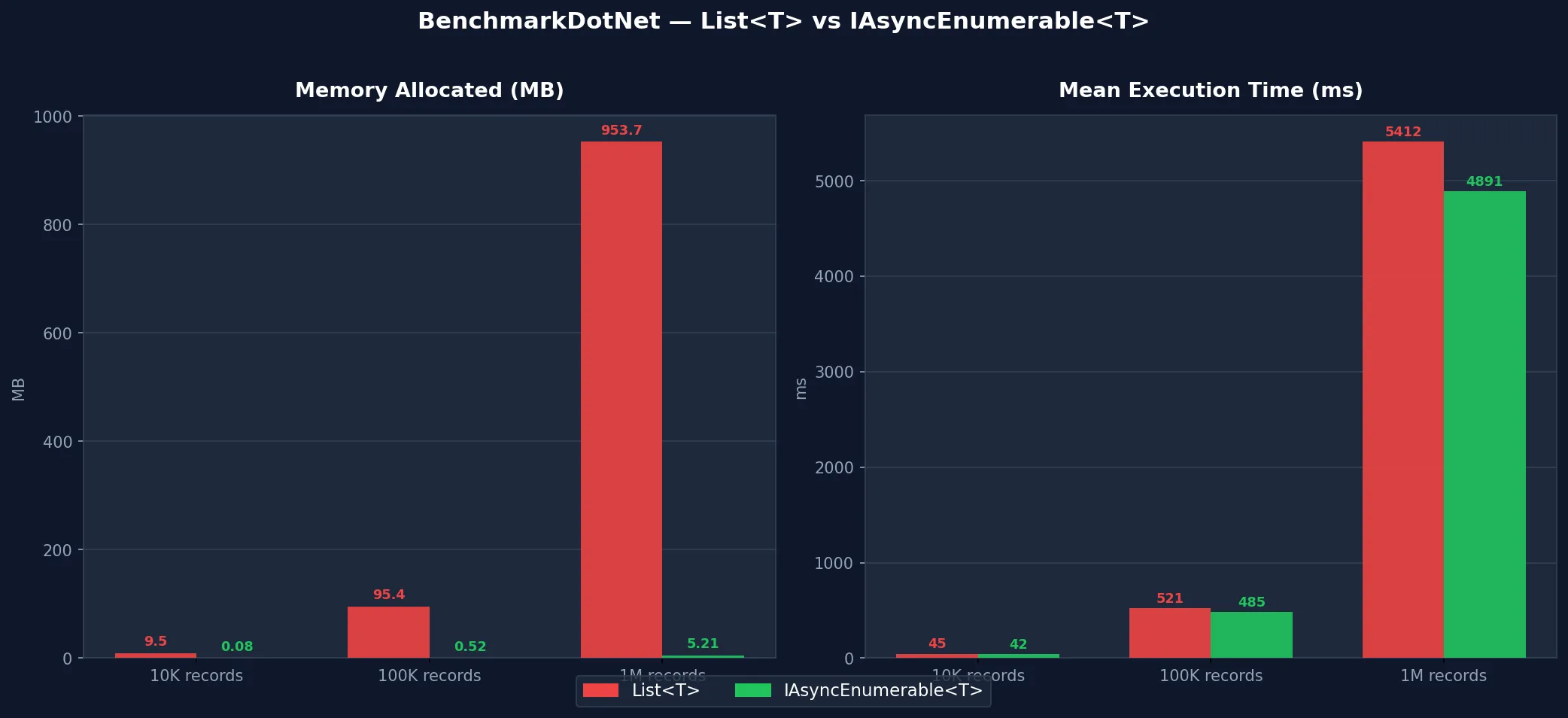
BenchmarkDotNet Results
Common Errors and How to Fix Them
I’ve made every single one of these. You don’t have to.
Error 1: Forgetting CancellationToken
// ❌ Bad: No way to cancel mid-stream
public async IAsyncEnumerable<Item> GetItemsAsync()
{
    await foreach (var item in _source.GetAsync())
    {
        yield return item; // Can't cancel this!
    }
}

// ✅ Good: Always include cancellation support
public async IAsyncEnumerable<Item> GetItemsAsync(
    [EnumeratorCancellation] CancellationToken ct = default)
{
    await foreach (var item in _source.GetAsync().WithCancellation(ct))
    {
        yield return item;
    }
}
Error 2: Buffering with ToListAsync()
// ❌ Bad: You just defeated the purpose
public async Task<List<Item>> GetItemsAsync() // Returns List<T>, not IAsyncEnumerable
{
    var items = new List<Item>();
    await foreach (var item in _source.GetAsync())
    {
        items.Add(item);
    }
    return items;
}

// ✅ Good: Return IAsyncEnumerable<T> directly
public IAsyncEnumerable<Item> GetItemsAsync(CancellationToken ct)
{
    return _source.GetAsync(); // Stream through
}
Error 3: Disposing Resources Too Early
// ❌ Bad: reader disposed before streaming completes
public async IAsyncEnumerable<string> ReadFileAsync(string path)
{
    using var reader = new StreamReader(path); // Disposed on first yield!

    while (await reader.ReadLineAsync() is { } line)
    {
        yield return line; // reader is already disposed
    }
}

// ✅ Good: Keep scope alive
public async IAsyncEnumerable<string> ReadFileAsync(
    string path,
    [EnumeratorCancellation] CancellationToken ct = default)
{
    using var reader = new StreamReader(path);

    try
    {
        while (await reader.ReadLineAsync(ct) is { } line)
        {
            yield return line;
        }
    }
    finally
    {
        // reader disposed when iteration completes or breaks
    }
}
Error 4: Not Configuring DbContext Lifetime
// ❌ Bad: Scoped DbContext disposed mid-stream in ASP.NET Core
[HttpGet("stream")]
public async IAsyncEnumerable<Order> GetOrders()
{
    var db = _serviceProvider.GetRequiredService<OrderDbContext>();
    // db will be disposed after the action method returns!

    await foreach (var order in db.Orders.AsAsyncEnumerable())
    {
        yield return order; // DbContext disposed here
    }
}

// ✅ Good: Use factory pattern for streaming
public class StreamingOrderService
{
    private readonly IDbContextFactory<OrderDbContext> _contextFactory;

    public async IAsyncEnumerable<Order> StreamOrdersAsync(
        [EnumeratorCancellation] CancellationToken ct = default)
    {
        await using var db = await _contextFactory.CreateDbContextAsync(ct);

        await foreach (var order in db.Orders.AsAsyncEnumerable().WithCancellation(ct))
        {
            yield return order;
        }
        // DbContext properly disposed when iteration completes
    }
}
Error 5: Ignoring Transaction Timeouts
// ❌ Bad: Long-running query may timeout
public async IAsyncEnumerable<Item> GetItemsAsync()
{
    await foreach (var item in _context.Items.AsAsyncEnumerable())
    {
        yield return item; // Connection held open indefinitely
    }
}

// ✅ Good: Set explicit command timeout
public async IAsyncEnumerable<Item> GetItemsAsync(CancellationToken ct)
{
    _context.Database.SetCommandTimeout(TimeSpan.FromMinutes(5));

    await foreach (var item in _context.Items.AsAsyncEnumerable().WithCancellation(ct))
    {
        yield return item;
    }
}
Best Practices
A few rules I now follow without thinking.
1. Always Accept CancellationToken
public async IAsyncEnumerable<T> StreamAsync(
    [EnumeratorCancellation] CancellationToken ct = default)
{
    await foreach (var item in _source.WithCancellation(ct))
    {
        ct.ThrowIfCancellationRequested(); // Optional: check between operations
        yield return await TransformAsync(item, ct);
    }
}
2. Use WithCancellation in Callers
await foreach (var item in service.StreamAsync().WithCancellation(ct))
{
    // Proper cancellation propagation
}
3. Configure JSON Buffer Sizes for HttpClient
var options = new JsonSerializerOptions
{
    DefaultBufferSize = 8192 // Adjust based on average payload size
};

await foreach (var item in JsonSerializer.DeserializeAsyncEnumerable<T>(
    stream, options, ct))
{
    // Optimal memory usage
}
4. Add Backpressure with ConfigureAwait
await foreach (var item in source.ConfigureAwait(false))
{
    // false reduces context switching in high-throughput scenarios
    await SlowOperationAsync(item).ConfigureAwait(false);
}
5. Use IAsyncDisposable for Resource Cleanup
public async IAsyncEnumerable<byte[]> StreamFileChunksAsync(
    string path,
    int chunkSize = 8192,
    [EnumeratorCancellation] CancellationToken ct = default)
{
    await using var fs = new FileStream(
        path,
        FileMode.Open,
        FileAccess.Read,
        FileShare.Read,
        bufferSize: chunkSize,
        useAsync: true);

    var buffer = new byte[chunkSize];
    int bytesRead;

    while ((bytesRead = await fs.ReadAsync(buffer, ct)) > 0)
    {
        yield return buffer.AsSpan(0, bytesRead).ToArray();
    }
}
6. Batch When Individual Items Are Too Small
public async IAsyncEnumerable<IReadOnlyList<T>> StreamBatchesAsync<T>(
    int batchSize = 100,
    [EnumeratorCancellation] CancellationToken ct = default)
    where T : class
{
    var batch = new List<T>(batchSize);

    await foreach (var item in _context.Set<T>().AsAsyncEnumerable().WithCancellation(ct))
    {
        batch.Add(item);

        if (batch.Count >= batchSize)
        {
            yield return batch;
            batch = new List<T>(batchSize);
        }
    }

    if (batch.Count > 0)
    {
        yield return batch;
    }
}
Conclusion
The mental shift is simple once it clicks:
- Before: Load everything → Process everything → Return everything
- After: Stream one item → Process it → Move to the next
That’s it. No magic, no complex setup. Just a different way of thinking about data flow.
Reach for IAsyncEnumerable
- ✅ You’re exporting database records by the thousands
- ✅ You’re processing large files (CSV, logs, JSON dumps)
- ✅ You’re consuming a streaming API
- ✅ Memory is a real concern on your server
Stick with List
- ❌ Your dataset is small (under ~1,000 items) — the overhead isn’t worth it
- ❌ You need random access or multiple iterations
- ❌ You’re chaining complex LINQ operations that don’t support streaming
The 95% memory reduction I got wasn’t theoretical. It was the difference between a service that crashed under load and one that handled the same data without breaking a sweat. Start with your EF Core queries and API clients — that’s where you’ll feel the impact immediately.