I went looking for the C# equivalent of the Claude Agent SDK: the package Anthropic ships for Python and TypeScript that wraps Claude Code’s tool-use loop, permission system, and subagents into something you can embed in your own app. There isn’t one, and Anthropic’s own docs say so without hedging: “The SDK is available as a library for Python and TypeScript only. To drive the same agent loop from another language, run the CLI as a subprocess.” C# doesn’t get a smaller version of the Agent SDK. It gets something else entirely: Anthropic’s SDK comparison page files the Anthropic NuGet package under “Client SDK”, the same category as Python, TypeScript, Go, Java, PHP, and Ruby, a general-purpose Messages API client, not an agent runtime.
That distinction is the reason this post exists. What I didn’t expect is that the Client SDK for C# already contains the piece that matters. Buried in anthropic-sdk-csharp’s own examples is client.Beta.Messages.ToolRunner: a helper that runs the full agentic loop (send messages → model asks for a tool → you run it → feed the result back → repeat) for you, against tools you define. It shipped in the SDK back in April 2026 (v12.16.0) and it’s still getting feature work in the latest release as of this writing (v12.49.0, from the day before this post), so it isn’t some abandoned corner of the beta namespace it lives in. The thesis here isn’t “here’s a workaround for a missing SDK.” It’s that you don’t need an Agent SDK to build an agent in C#, because the Client SDK you’d install anyway already exposes the loop.
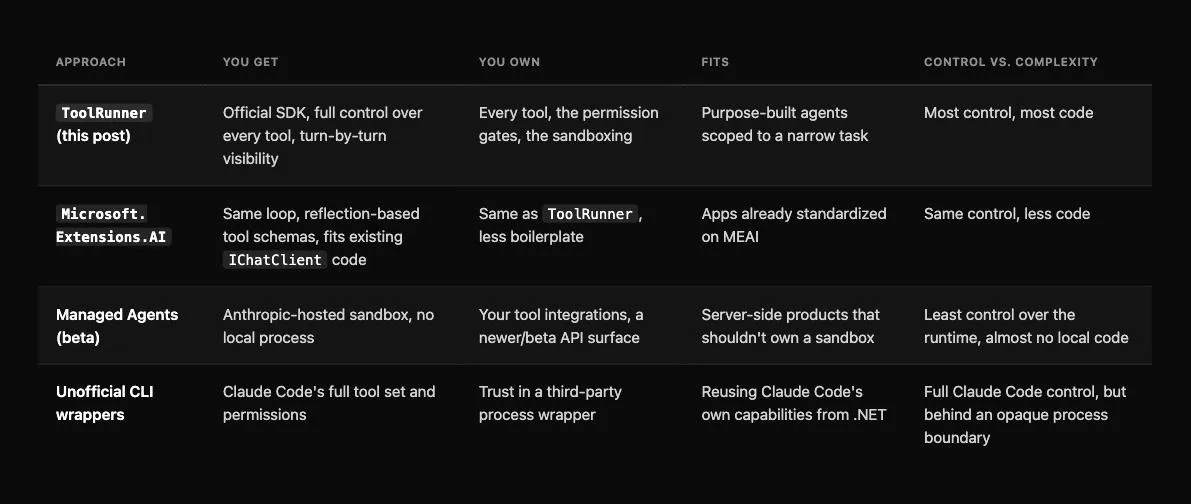
This post builds a small but real coding agent on top of it (one that can read files, list a directory, write files, and run shell commands against a workspace), then compares that path against the other two options that exist today: wrapping the same loop in Microsoft.Extensions.AI, and the unofficial .NET ports of the Claude Code CLI itself.
Code
Both versions built below are runnable end to end in a companion repo: claude-agent-csharp. It has ToolRunnerAgent for the raw SDK loop and MeaiAgent for the Microsoft.Extensions.AI version, same four tools, same scoped workspace, same confirmation gates. Both build clean against .NET 10, pinned to Anthropic 12.49.0 and Microsoft.Extensions.AI 10.10.0, whatever dotnet add package resolves to today; you only need an ANTHROPIC_API_KEY to run them.
What “agent” means here
A chat client answers questions. An agent decides which of your functions to call, in what order, based on what previous calls returned, until it thinks the task is done, without you writing the branching logic for that decision yourself.
The mechanics behind every implementation of that idea are the same three steps, repeated:
- Send the conversation to the model, along with a list of tools it’s allowed to use.
- If the model’s response contains a
tool_useblock instead of (or alongside) text, run the tool locally and send the result back as atool_resultblock. - Repeat until the model responds with
stop_reason: "end_turn"(no more tools requested).
ToolRunner implements exactly that loop. You give it the initial request and a list of tools; it hands you back one message per turn as an IAsyncEnumerable, running your tool code in between.
Defining a tool
A tool for ToolRunner is a BetaRunnableTool: a JSON Schema description the model reads, plus a Run delegate that executes when the model asks for it. Here’s read_file, scoped to a workspace directory so the agent can’t read arbitrary paths on the host:
using System.Text.Json;
using Anthropic;
using Anthropic.Helpers.Beta;
using Anthropic.Models.Beta.Messages;

var client = new AnthropicClient();
var workspaceRoot = Path.GetFullPath("./workspace");

string ResolveInWorkspace(string relativePath)
{
    var fullPath = Path.GetFullPath(Path.Combine(workspaceRoot, relativePath));
    if (!fullPath.StartsWith(workspaceRoot, StringComparison.Ordinal))
        throw new UnauthorizedAccessException($"'{relativePath}' escapes the workspace.");
    return fullPath;
}

var readFileTool = new BetaRunnableTool
{
    Name = "read_file",
    Definition = new BetaTool
    {
        Name = "read_file",
        Description = "Reads a UTF-8 text file from the workspace and returns its contents.",
        InputSchema = new InputSchema
        {
            Properties = new Dictionary<string, JsonElement>
            {
                ["path"] = JsonSerializer.SerializeToElement(
                    new { type = "string", description = "Path relative to the workspace root" }),
            },
            Required = ["path"],
        },
    },
    Run = (toolUse, _) =>
    {
        var path = toolUse.Input["path"].GetString()!;
        var content = File.ReadAllText(ResolveInWorkspace(path));
        return Task.FromResult<BetaToolResultBlockParamContent>(content);
    },
};
list_directory follows the same shape (one string input, one string result):
var listDirectoryTool = new BetaRunnableTool
{
    Name = "list_directory",
    Definition = new BetaTool
    {
        Name = "list_directory",
        Description = "Lists files and subdirectories at a path inside the workspace.",
        InputSchema = new InputSchema
        {
            Properties = new Dictionary<string, JsonElement>
            {
                ["path"] = JsonSerializer.SerializeToElement(
                    new { type = "string", description = "Path relative to the workspace root, or \".\" for the root" }),
            },
            Required = ["path"],
        },
    },
    Run = (toolUse, _) =>
    {
        var path = toolUse.Input["path"].GetString()!;
        var entries = Directory.GetFileSystemEntries(ResolveInWorkspace(path))
            .Select(Path.GetFileName);
        return Task.FromResult<BetaToolResultBlockParamContent>(string.Join("\n", entries));
    },
};
The two tools that matter more are the ones that change something.
The tools that touch the filesystem and the shell need a gate
Anything that reads is safe to auto-run. Anything that writes a file or executes a command isn’t. Not because the model is untrustworthy, but because a wrong guess (a bad path, a destructive one-liner) is exactly the kind of thing that shouldn’t happen without a human in the loop, the same principle behind failing safe on exceptions rather than trusting input by default.
write_file asks before it writes:
var writeFileTool = new BetaRunnableTool
{
    Name = "write_file",
    Definition = new BetaTool
    {
        Name = "write_file",
        Description = "Writes UTF-8 text to a file in the workspace, creating directories as needed.",
        InputSchema = new InputSchema
        {
            Properties = new Dictionary<string, JsonElement>
            {
                ["path"] = JsonSerializer.SerializeToElement(new { type = "string" }),
                ["content"] = JsonSerializer.SerializeToElement(new { type = "string" }),
            },
            Required = ["path", "content"],
        },
    },
    Run = async (toolUse, ct) =>
    {
        var path = toolUse.Input["path"].GetString()!;
        var content = toolUse.Input["content"].GetString()!;
        var fullPath = ResolveInWorkspace(path);

        Console.WriteLine($"\n  [confirm] write {content.Length} chars to '{path}'? (y/n)");
        if (Console.ReadLine()?.Trim().ToLowerInvariant() != "y")
            return "The user declined this write.";

        Directory.CreateDirectory(Path.GetDirectoryName(fullPath)!);
        await File.WriteAllTextAsync(fullPath, content, ct);
        return $"Wrote {content.Length} characters to {path}.";
    },
};
run_command adds a second gate on top of confirmation: an allowlist, so the model can’t even propose something outside a known set of programs.
using System.Diagnostics;

var allowedPrograms = new HashSet<string> { "dotnet", "git", "ls" };

var runCommandTool = new BetaRunnableTool
{
    Name = "run_command",
    Definition = new BetaTool
    {
        Name = "run_command",
        Description = "Runs an allowlisted shell command inside the workspace and returns its output.",
        InputSchema = new InputSchema
        {
            Properties = new Dictionary<string, JsonElement>
            {
                ["command"] = JsonSerializer.SerializeToElement(new { type = "string" }),
            },
            Required = ["command"],
        },
    },
    Run = async (toolUse, ct) =>
    {
        var command = toolUse.Input["command"].GetString()!;
        var program = command.Split(' ', 2)[0];
        if (!allowedPrograms.Contains(program))
            return $"Blocked: '{program}' is not on the allowlist.";

        Console.WriteLine($"\n  [confirm] run '{command}' in {workspaceRoot}? (y/n)");
        if (Console.ReadLine()?.Trim().ToLowerInvariant() != "y")
            return "The user declined this command.";

        var psi = new ProcessStartInfo(OperatingSystem.IsWindows() ? "cmd.exe" : "/bin/sh")
        {
            ArgumentList = { OperatingSystem.IsWindows() ? "/c" : "-c", command },
            WorkingDirectory = workspaceRoot,
            RedirectStandardOutput = true,
            RedirectStandardError = true,
        };

        using var process = Process.Start(psi)!;
        var stdout = await process.StandardOutput.ReadToEndAsync(ct);
        var stderr = await process.StandardError.ReadToEndAsync(ct);
        await process.WaitForExitAsync(ct);
        return $"{stdout}\n{stderr}".Trim();
    },
};
Neither gate is optional in practice. The allowlist stops the model from ever proposing rm -rf in the first place; the confirmation stops a legitimate-looking git or dotnet command from running unattended before you’ve read it. This is also the exact gap the CLI-wrapper SDKs in the last section fill for you automatically: Claude Code’s own permission system already does this, with hooks and an allowedTools config, so you don’t hand-roll it. Building on ToolRunner directly means you own this layer yourself.
Wiring it into the loop
With the tools defined, running the agent is the part ToolRunner was built for:
var runner = client.Beta.Messages.ToolRunner(
    new MessageCreateParams
    {
        Model = Anthropic.Models.Messages.Model.ClaudeSonnet5,
        MaxTokens = 4096,
        Messages =
        [
            new()
            {
                Role = Role.User,
                Content = "Add a .gitignore for a .NET project to the workspace, then run `git status`.",
            },
        ],
    },
    [readFileTool, listDirectoryTool, writeFileTool, runCommandTool]
);

await foreach (var message in runner)
{
    foreach (var block in message.Content)
    {
        if (block.TryPickText(out var text))
            Console.WriteLine(text.Text);
    }
}
Each iteration of await foreach is one full model turn. Behind the scenes, every tool_use block in that turn gets matched to the tool by name, run, and its result appended as a tool_result before the next request goes out. The loop keeps advancing on its own until the model has nothing left to ask for.
The same loop through Microsoft.Extensions.AI
If you’re already on the IChatClient abstraction from the MEAI post, you don’t need ToolRunner at all. UseFunctionInvocation() gives you the same loop, driven off C# methods instead of hand-written JSON Schema:
using System.ComponentModel;
using Anthropic;
using Microsoft.Extensions.AI;

[Description("Reads a UTF-8 text file from the workspace and returns its contents.")]
string ReadFile([Description("Path relative to the workspace root")] string path) =>
    File.ReadAllText(ResolveInWorkspace(path));

[Description("Writes UTF-8 text to a file in the workspace, after confirmation.")]
string WriteFile(string path, string content)
{
    Console.WriteLine($"\n  [confirm] write {content.Length} chars to '{path}'? (y/n)");
    if (Console.ReadLine()?.Trim().ToLowerInvariant() != "y")
        return "The user declined this write.";

    var fullPath = ResolveInWorkspace(path);
    Directory.CreateDirectory(Path.GetDirectoryName(fullPath)!);
    File.WriteAllText(fullPath, content);
    return $"Wrote {content.Length} characters to {path}.";
}

IChatClient chatClient = new AnthropicClient()
    .AsIChatClient("claude-sonnet-5")
    .AsBuilder()
    .UseFunctionInvocation()
    .Build();

ChatOptions options = new() { Tools = [AIFunctionFactory.Create(ReadFile), AIFunctionFactory.Create(WriteFile)] };

var response = await chatClient.GetResponseAsync(
    "Add a .gitignore for a .NET project to the workspace, then show me its contents.", options);

Console.WriteLine(response);
AIFunctionFactory.Create reflects over the method signature and [Description] attributes to build the schema ToolRunner needed you to write by hand. The trade-off is visibility: ToolRunner hands you every intermediate turn as you iterate; FunctionInvokingChatClient runs the whole loop internally and gives you the final answer, with the intermediate tool-call and tool-result messages available on the response afterward rather than streamed to you as they happen. Pick ToolRunner when you want to observe or interrupt the loop turn by turn; pick MEAI when you already have the abstraction in place and just want the result.
Where this doesn’t reach: Managed Agents and the CLI wrappers
Two other options exist, worth knowing about even though this post doesn’t use them.
Managed Agents
This is Anthropic’s own hosted alternative, also in the C# SDK’s beta namespace (Anthropic.Models.Beta.Agents, .Environments, .Sessions). You create an Environment, an Agent, and a Session, then stream session events until the agent goes idle. Anthropic runs the sandbox; you don’t manage a local process or a workspace directory at all. It’s a heavier commitment: server-side state, a different mental model (sessions and events, not messages and tool calls), and still a beta surface, so I haven’t put it in front of a real workload yet.
The unofficial CLI wrappers
These take a different approach entirely: they shell out to the actual Claude Code CLI and expose its output as a .NET API. There are at least three separate projects along these lines, claude-agent-sdk-dotnet (variations of that name from gunpal5, 0xeb, and AJGit) and claude-code-sdk-csharp (from zxyao145 and VeyDlin). That gets you Claude Code’s full tool set (file edits, bash, web fetch, subagents) and its permission system for free, at the cost of a CLI dependency and trusting a third-party wrapper around it. I haven’t run any of them against a real task, so treat that as a lead to evaluate rather than a recommendation: check activity and issue history before depending on one.
Conclusion
The absence of an official “Claude Agent SDK” package for C# isn’t the gap it first looks like. The loop that package exists to hide is a few dozen lines against ToolRunner, and the primitive is already in the SDK you’d install anyway. What C# doesn’t have yet is the higher-level layer Python and TypeScript get for free: built-in permission modes, hooks, and subagents, the parts that turn a tool-use loop into something like Claude Code itself. Until Anthropic decides to ship that, the honest answer is that you’re the one who builds it, and now you know exactly how much of it you’d have to build yourself.